Contents
Contents
What is Auto-Correct on Fuse?
Fuse Auto-Correct is a dynamic feature that takes your CSV import experience to the next level. With Auto-Correct, you can now define rules to automatically correct issues in uploaded CSV files. Some examples of things you can do with Auto-Correct include:
- Combine first_name and last_name columns into a full_name column
- Auto-format uploaded dates to the format accepted by your system
- Add a country code to uploaded phone numbers
With Auto-Correct, users can now define transformations for individual columns, automating the process of adjusting field values according to their preferences.
How Does It Work?
Define Transformations:
- Users have the flexibility to choose from a variety of transformations, such as “uppercase” for string columns, “date format” adjustments, and more.
- Simply set your desired transformation rules during the import setup process.
Effortless Auto-Correction:
- Once your file is uploaded and you reach the “Review” step, Fuse automatically applies the defined transformations to the corresponding columns.
- Watch as your data is instantly refined to meet your specifications without manual intervention.
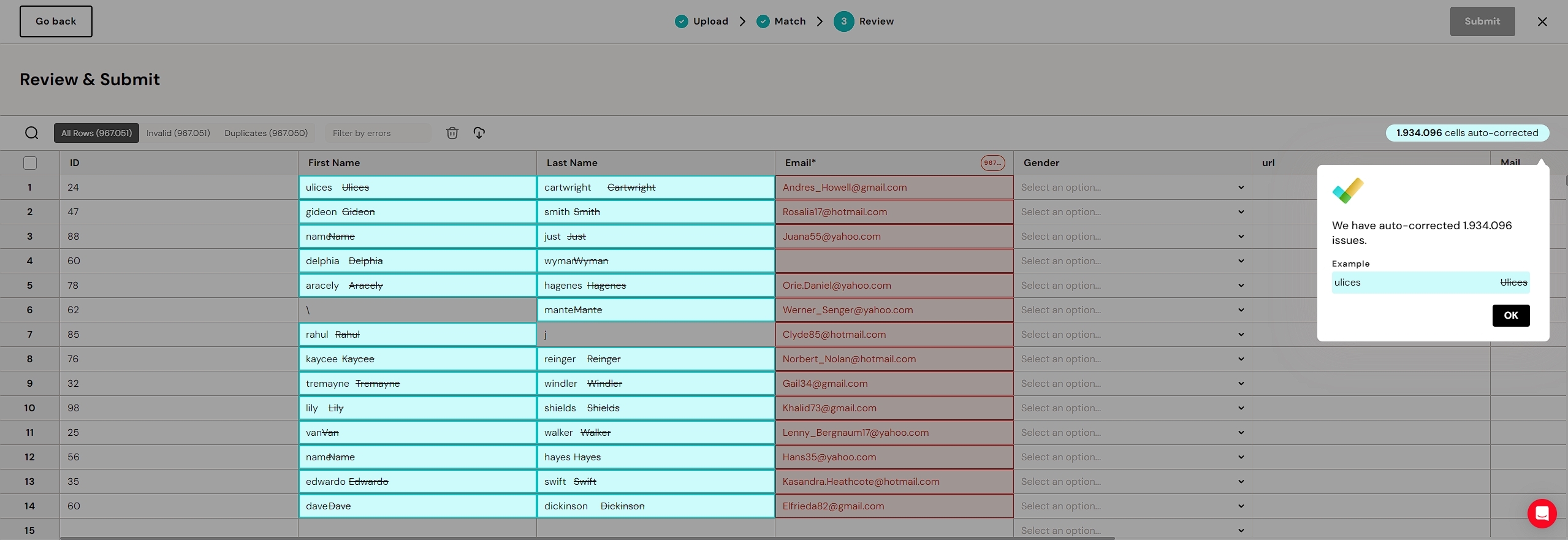
We show a tooltip with the counter of how many fields we auto-corrected based on the applied transformation for different columns.
Why Choose Fuse Auto-Correct?
-
Streamlined Process:
Say goodbye to time-consuming manual corrections. Auto-Correct ensures a swift and error-free import process.
Customizable Transformations:
Tailor the transformations to your specific needs. Whether it’s standardizing text formats or adjusting date fields, the power is in your hands.
Real-time Feedback:
Stay informed with our intuitive tooltip feature. It provides a live counter of how many fields were auto-corrected based on the applied transformations for each column.
User-Friendly Experience with Tooltip Insights
We understand the importance of transparency and visibility in your data workflows. That’s why Fuse includes a tooltip feature in the “Review” step. This tooltip not only showcases the applied transformations but also provides a real-time counter, giving you instant insights into the impact of your chosen corrections.
Get Started with Fuse Auto-Correct Today
Embrace the future of CSV imports with Fuse Auto-Correct. Make data transformation a breeze and elevate your data management experience. Ready to explore the possibilities? Dive into the enhanced features of Fuse today.
Professional CSV Import Solution
Get the CEO's Take
Handpicked tech insights and trends from our CEO.
Professional CSV Import Solution
Get the CEO's Take
Handpicked tech insights and trends from our CEO.